Frozen Free Fall: Snowball Fight on Cloud Gaming
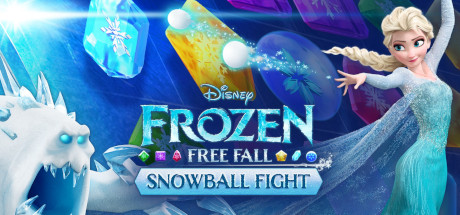
Frozen Free Fall: Snowball Fight is playable on 3 cloud gaming services, Xbox Cloud, Shadow, and airgpu. Stream your own copy from stores like Xbox Store, or install it on a full cloud computer. Compare all options below to play on PC, Mac, Android, iOS, and more via browser or app.
All platforms verified ## minutes ago.
Last updated on .
Frozen Free Fall: Snowball Fight is available on:

Subscription plans:
Neo
Own game required*
Power
Own game required*
View details

Subscription plans:
low config
Own game required*
high config
Own game required*
View details

Frozen Free Fall: Snowball Fight is not available on:

Boosteroid
Boosteroid
Unavailable
Plan:
Any tier

GeForce Now
GeForce Now
Unavailable
Plan:
Any tier

CloudDeck
CloudDeck
Unavailable
Own game required
Plan:
Any tier

Amazon Luna
Amazon Luna
Unavailable
Plan:
See details

Playstation Cloud
PS Cloud
Unavailable
Plan:
Any tier

Blacknut
Blacknut
Unavailable
Game included
Plan:
Any tier
See how we track availability. Found incorrect data? Please let us know. Thanks for your help!
Description: Frozen Free Fall: Snowball Fight is an epic matching puzzle game now featuring 375 challenging levels, a local multiplayer mode, stunning HD graphics and more.
Disney Interactive
Developer: SuperVillain Studios
Release Date: 15.09.2015


Frozen Free Fall: Snowball Fight cloud gaming reviews
No reviews yet. Played Frozen Free Fall: Snowball Fight in the cloud? Rate how it ran on your service:
Your rating helps other players pick a service. No text needed.
Frequently Asked Questions
Can you play Frozen Free Fall: Snowball Fight on cloud gaming?
Which cloud gaming services support Frozen Free Fall: Snowball Fight?
Do I need to buy Frozen Free Fall: Snowball Fight for cloud gaming?
Can you play Frozen Free Fall: Snowball Fight in your browser?
On which devices is Frozen Free Fall: Snowball Fight available via cloud gaming?
Can you play Frozen Free Fall: Snowball Fight for free on cloud gaming?